UniformRays.rayCountHistogram
- raytracing.UniformRays.rayCountHistogram(self, binCount=None, minValue=None, maxValue=None)
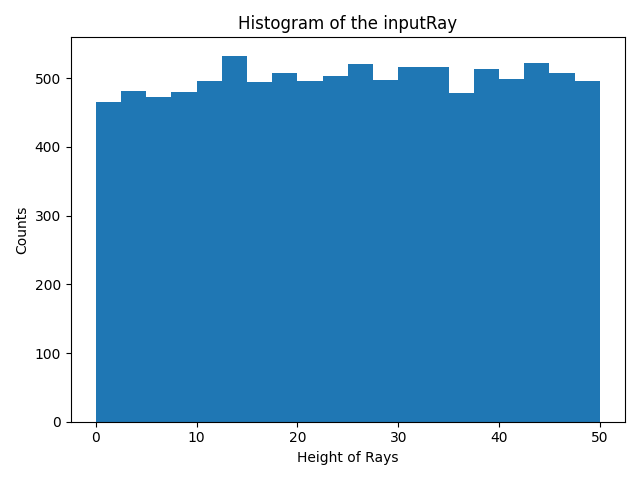
This functions calculates the histogram for the height of the rays.
- Parameters:
binCount (int) – number of defined bins in the histogram. If it is not defined, the histogram will have 40 bins.
minValue (float) – The minimum value to be considered in the histogram. If it is not defined in the inputs, the minimum height of rays will be assigned to this parameter.
maxValue (float) – The maximum value to be considered in the histogram. If it is not defined in the inputs, the maximum height of rays will be assigned to this parameter.
- Returns:
_xValuesCountHistogram (array) – An array (Bins*1) that includes the x values for bins.
_yHistogram (array) – An array (Bins*1) that includes the y values for bins.
Examples
The function can be used to calculate the x values and y values for the histogram of an input ray.
>>> from raytracing import *
>>> nRays = 10000 # Increase for better resolution
>>> minHeight=0
>>> maxHeight=50
>>> nBin=20
>>> inputRays = RandomUniformRays(yMin=minHeight,yMax=maxHeight, maxCount=nRays)
>>> [xVal,yVal]=inputRays.rayCountHistogram(binCount=nBin)
And to plot the hitogram we can use xVal and yVal as the following:
>>> import matplotlib.pyplot as plt
>>> _ = plt.figure()
>>> _ = plt.bar(xVal,yVal,width=maxHeight/nBin)
>>> _ = plt.title('Histogram of the inputRay')
>>> _ = plt.ylabel('Counts')
>>> _ = plt.xlabel('Height of Rays')
>>> _ = plt.show()
See also
raytracing.rays.rayAnglesHistogram