ImagingPath.apertureStop
- raytracing.ImagingPath.apertureStop(self)
The “aperture stop” is an aperture in the system that limits the cone of angles originating from zero height at the object plane.
- Returns:
apertureStop – Returns an array including the position (index [0] of the output) and diameter (index [1] of the output) of the aperture stop. If there are no elements of finite diameter (i.e. all optical elements are infinite in diameters), then there is no aperture stop in the system and the size of the aperture stop is infinite (+Inf).
- Return type:
(float,float)
Examples
>>> from raytracing import *
>>> path = ImagingPath() # define an imaging path
>>> path.objectHeight=6
>>> # use append() to add elements to the imaging path
>>> path.append(Space(d=20))
>>> path.append(Lens(f=20,diameter=5,label="f=20"))
>>> path.append(Space(d=30))
>>> path.append(Lens(f=10,diameter=10,label="f=10"))
>>> path.append(Space(d=10))
>>> print('The position of aperture stop is:', path.apertureStop()[0])
The position of aperture stop is: 20.0
>>> print('The diameter of aperture stop is:',path.apertureStop()[1])
The diameter of aperture stop is: 5
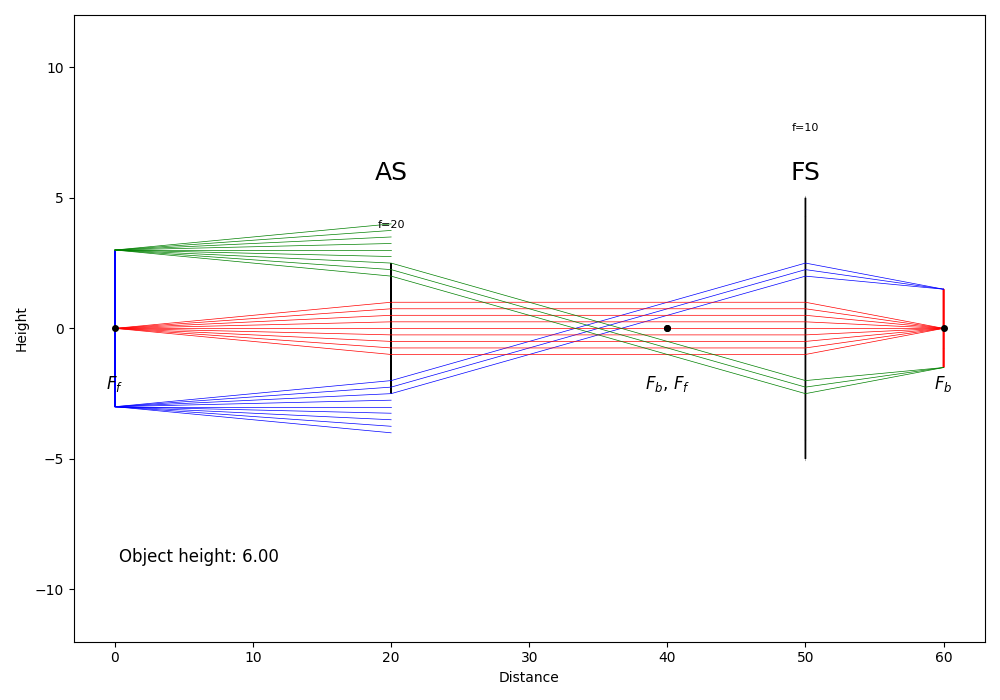
Also, as the following, you can use display() to follow the rays in the imaging path and view the aperture stop and field stop. Since the diameter of the first lens (f=20) is limited, this is the aperture stop in the imaging path.
>>> path.display()
See also
raytracing.ImagingPath.apertureStopPosition,raytracing.ImagingPath.apertureStopDiameter,raytracing.ImagingPath.fieldStopNotes
Strategy: we take a ray height and divide by real aperture diameter at that position. Some elements may have a finite length (e.g., Space() or ThickLens()), so we always calculate the ratio before propagating inside the element and after having propagated through the element. The position where the absolute value of the ratio is maximum is the aperture stop.